Anomaly Detection | Multi Variate
Validation Error: Time
The time selection has a red outline and an error message, and the "Fetch Results" button is disabled.
Why does this happen?
The time field does not contain a valid input. This may happen if the time is manually inputted incorrectly.
What should you do?
- Ensure both times follow the format: YYYY-MM-DD HH:mm:ss.
- Try selecting the time directly from the calendar.
- The start time must be at least 1 second before the end time.
Part Attributes: Selection is required
Why does this happen?
This error occurs when you add a part attribute filter but do not finish setting it up.
What should you do?
Ensure that every part attribute filter has:
- A non-empty attribute name
- At least one value selected
If you do not want a filter, remove it before fetching results.
The existing monitor [name] is identical to the monitor you have already created.
Why does this happen?
There is already a monitor with the same configuration (e.g., signals, filters, thresholds).
What should you do?
- Modify the parameters to create a unique monitor.
- If you are only looking to rename a monitor, edit the existing one in System Settings.
Monitor name already exists
Why does this happen?
There is already a monitor with the same name in MVD monitors.
What should you do?
- Choose a different name. Monitor names are case-sensitive.
- Alternatively, edit the existing MVD monitor in System Settings.
No data available for the selected options
Why does this happen?
LinePulse searched for data matching your request but could not find any recorded results for that specific combination of signals and filters.
What should you do?
- Check if the selected signals contain desired data during the chosen period.
- Try expanding your time range.
- If you are filtering by specific part attributes or model numbers, try removing some filters to see a broader set of results.
Signal not found
Displayed instead of the signal name
What does this look like?
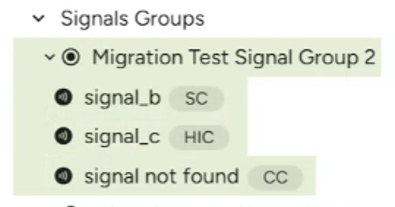
Why does this happen?
The system found data for a signal but could not display its name. This can occur if the signal was saved in a signal group and later changed.
What should you do?
- If the name does not appear after a short wait, try refreshing the page.
- You can still view the data even if the label shows as a placeholder.
This query is too large. Please reduce the query size and try again.
Why does this happen?
If the requested data is too extensive, the calculation will exceed the processing limit and the system will stop the task. If you select a very large time range you may go over this limit.
What should you do?
- Try selecting a shorter time range.
- If you are including many model numbers or part attributes, try narrowing your selection.
- After making these changes, generate the query again.