Part History
About the Part History Module
Use the Part History module to view a complete record for any specific part on your production line, identified by its serial number. This is useful when investigating a defective part, confirming what measurements were recorded at each station, or understanding how a component fits into a larger assembly.
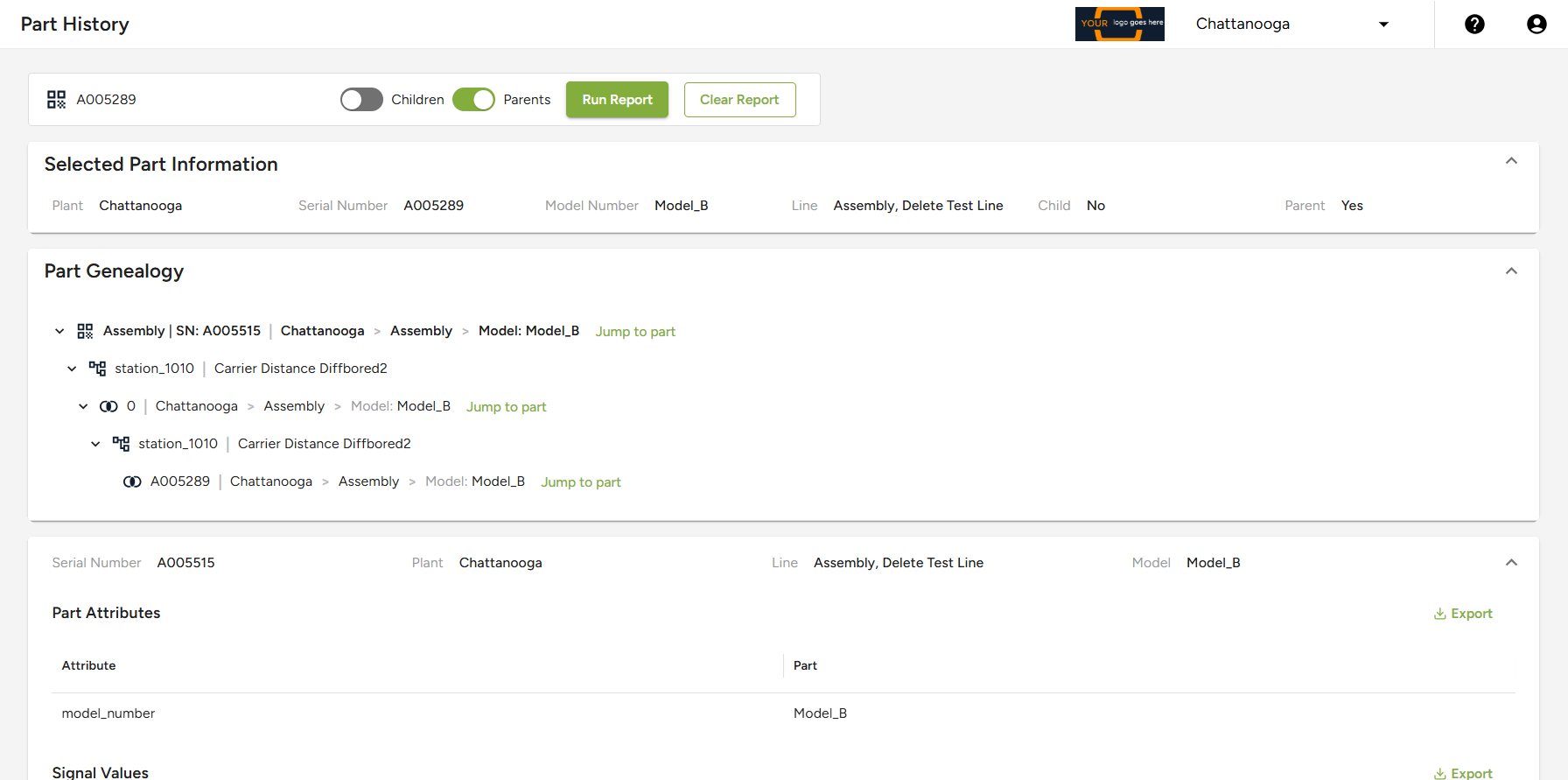
When you run a Part History query, LinePulse displays the following:
- Selected Part Information — A summary of the part, including its serial number, model number, production line, and plant. It also shows whether you have enabled the Parents or Children genealogy toggles for this query.
- Part Genealogy — A tree view showing how the part relates to other parts on the line. See Part Genealogy below.
- Part Attributes — Details recorded for the part, such as model number or colour.
- Signal Values — All measurements recorded at each station as the part moved through the line, including results, any failure modes, applicable limits (LSL, USL, LCL, UCL), and time. Note that for large lines, part history data is stored for 1 year.
Part Genealogy
In manufacturing, parts are often built into larger assemblies. LinePulse tracks these relationships so you can trace a component through the entire production process.
- A parent part is an assembly that this part was built into. For example, if you are viewing a sub-component like a fastener or bracket, its parent would be the larger assembly it was attached to during production.
- A child part is a sub-component that was assembled into this part. For example, if you are viewing a finished assembly, its children are the individual components used to build it.
Part marriage is the process of linking a child part to a parent assembly during production. When a marriage occurs LinePulse records that relationship. This allows you to trace a faulty component forward to every assembly it ended up in, or trace a finished assembly backward to every individual part it contains.
Use the Children and Parents toggles when running a Part History query to include genealogy data in your results.
Feeder line configuration defines how genealogy is traversed across connected lines and is important even when the lines are within the same plant. Without the correct feeder-target relationship, the system may still identify parent and first-level child relationships, but deeper descendants, such as grandchildren, may not be included. Adding, removing, or changing a feeder relationship triggers a recomputation of part marriages for the feeder, target, and any lines connected to them directly or indirectly through feeder-target relationships. Unrelated lines in the same plant or different plants are not affected, and their part marriages continue to function normally.
In addition, changing the Component ID entity type, or adding or deleting a Component ID, also triggers a recomputation of part marriages.
Recomputation time depends on the amount of data on the affected lines and the number of components. It is generally expected to complete within one day. During this time, genealogy data for the affected lines may be temporarily incomplete or contain mismatched part relationships.
Working with Part History Queries
To create a Part History query
From the sidebar, click Part History.
LinePulse displays the Part History module.
Enter a part serial number.
LinePulse searches the entire plant.
(Optional) Select
ChildrenorParentsto view part genealogy.Click
Run Report.LinePulse displays dropdown menus with part information.
If a Part History query returns more than 5,000 records, LinePulse automatically enables pagination and displays page navigation controls below the table.
In this case, the Export button still exports all matching records, not just the records shown on the current page. For large exports, the download may take several minutes.
Sorting and filtering only apply to the current page of results and do not work across all pages.
To modify your query, repeat the steps above. LinePulse remembers your previously entered query information until you log out.
To clear a Part History query
From the Part History module, with a query loaded, click
Clear Report.
Troubleshooting Genealogy Results
In most cases, a misconfigured component signal can link parts that should not be connected. When that happens, the server may try to retrieve all linked records and eventually time out.
Some lines also contain much more data than others. If the searched part belongs to one of those lines, the query may time out. In that case, developers are typically already alerted and can optimize the line data so records are fetched faster. If the issue persists for more than a couple of days, contact support.
If a part, or a sub-component of a part, was attached to more than one part, the parent part that was completed most recently will be visible.
For example, if motor M has records of being attached to car C1 and car C2, and car C2 was completed last, searching genealogy for M, C1, or C2 will only return C2 and M.
This can also indicate a misconfigured component signal that links multiple unrelated parts together. For example, if a model number signal is incorrectly configured as a component signal, it can link all parts with that model number together. When any part with that model number is searched, the last completed part with that model number may be returned as the genealogy result.
You can verify whether a component signal is misconfigured by checking the components in the returned genealogy. Review the different signals for each component, confirm their signal types, and make sure a signal was not incorrectly configured as a component.
A part should not have work records in a feeder line after it has completed work on a target line for that feeder line. If the genealogy algorithm finds those records, it removes them before computing the genealogy.
In most cases, this means a line was configured as a feeder line for the wrong target line.
If a duplicate signal and station are found in the genealogy tree, that usually means a component signal is linking multiple different parts that are not supposed to be linked. In that case, the genealogy may contain parts with the same signal and station, and rendering of the genealogy in the UI is prevented.